Speeding up WordPress imports with Datafeedr or WP All Import

Dave Hilditch •
Case Studies & Success Stories article header

Some of you may be aware of my External WordPress Images plugin – it basically lets you avoid storing images in WordPress and instead the images are fetched from a remote location. This speeds up imports massively.

But what if you are importing images and still want faster imports?

Debugging WordPress Import Performance

Firstly, I had to analyse what was wrong with the import. So I activated the slow query log (see my slow query log setup guide) and unfortunately found no slow queries to optimise. So what next?

Next, I installed Xdebug (see my guide to activating and using xdebug to analyse PHP performance here), visited the WP All Import import page where the import was ready to run and then restarted PHP to activate the new xdebug settings I had just configured. This is because with the import, I can’t add the URL trigger to force xdebug into action for imports, so I have to run it for everything. I highly advise you don’t do this on a live server, or if so, do it at a quiet time.

Then I looked at the cache grind files to identify which file was still growing in size – WP All Import uses one PHP process for each batch of items it’s importing, so as long as you’re still on the first batch and the file is still growing, you know which cache grind to look at.

Once I had that, I downloaded the cache grind file, opened it with QCacheGrind and saw this:
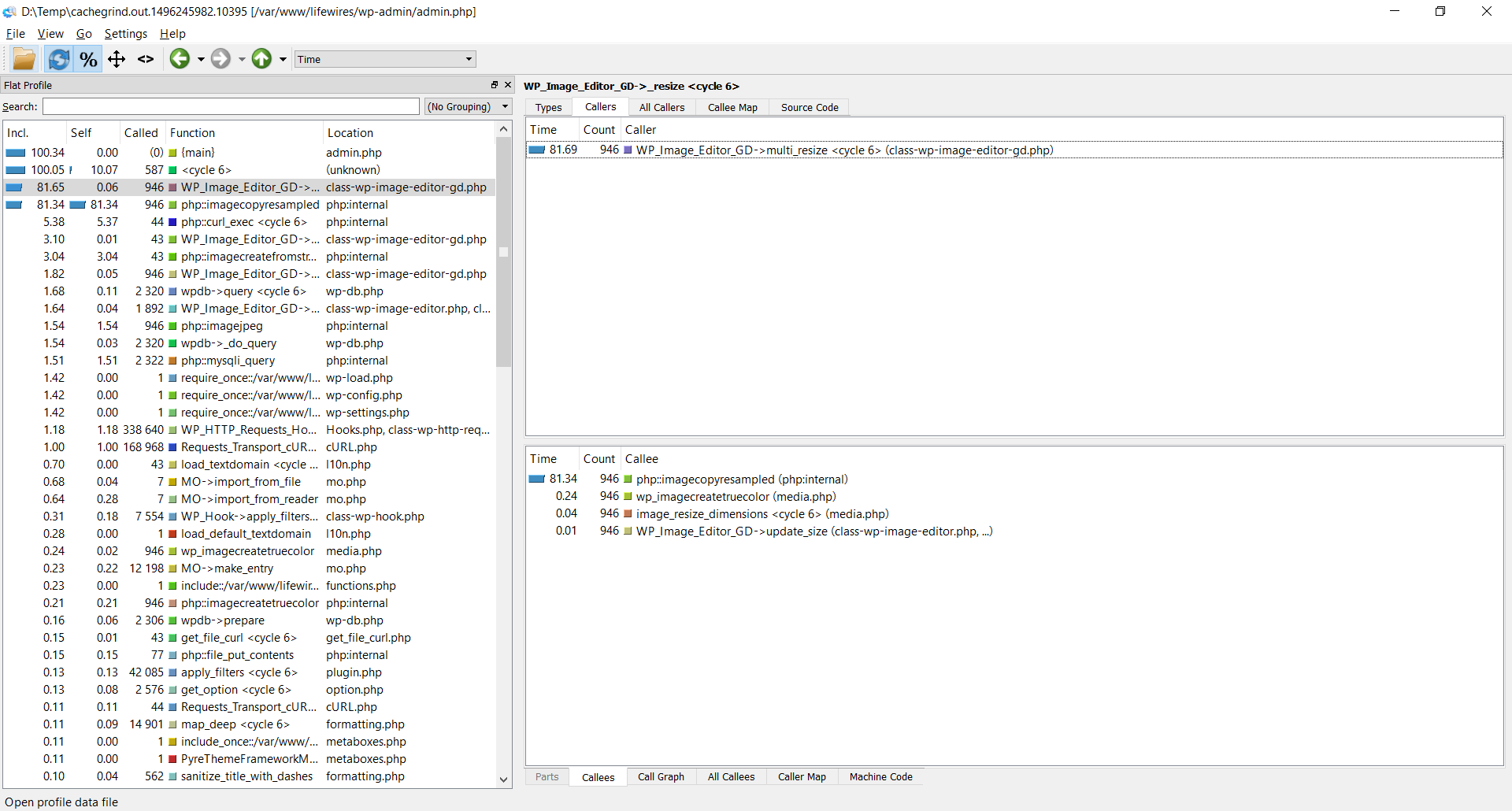
QCacheGrind output showing image resizing consuming 82% of WordPress import time - Speeding Up WordPress Imports

What the picture above tells me (generated with QCachegrind from the output of Xdebug) is that image resizing is consuming 82% of the import time.

The solution

One thing you need to be aware of with WordPress is that various plugins, themes, and custom code can register ‘image sizes’. These image sizes are then used in code to grab a thumbnail. The theory is to speed up your site – rather than sending a large file to a user, you send a small file. It’s also used to create cropped images.

Anyway, I installed this awesome like plugin – https://wordpress.org/plugins/image-sizes/ – you can learn more about the author of this plugin here: http://nazmulahsan.me/stop-wordpress-generating-multiple-image-sizes/

It’s clearly an unsung little plugin with only 700 downloads, but it’s truly awesome.

With it installed, I visit the Image Sizes menu and see this:
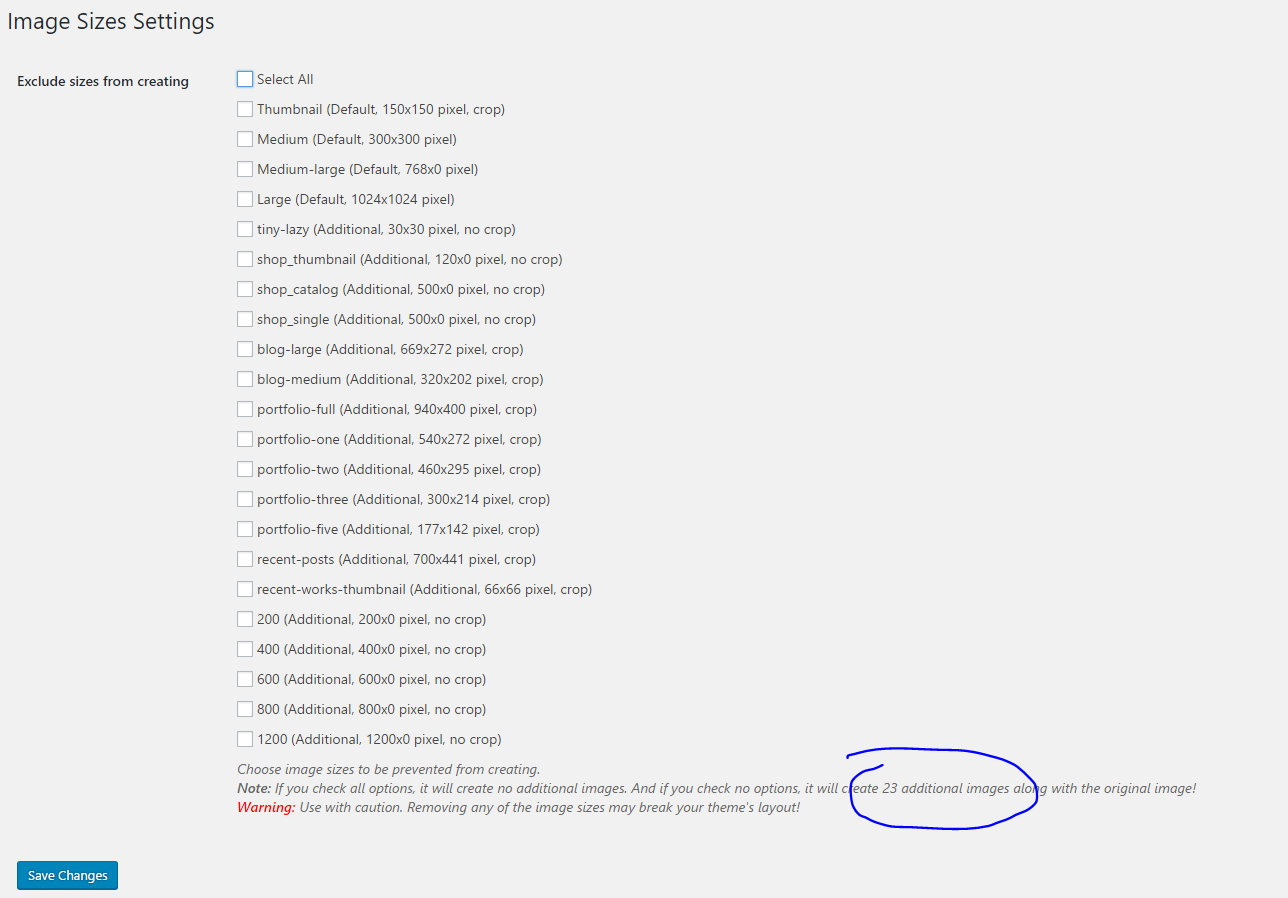
Image Sizes settings menu highlighting unnecessary image sizes during imports

Now – we KNOW that the items being imported aren’t being used in the portfolio section, in this case they’re being used in a WooCommerce shop, so really there’s only 2 sizes needed.

In any case, it’s a simple matter of ticking the boxes for the images you don’t want to keep – for guaranteed compatibility, make sure you choose to keep the largest of each group of image sizes – e.g. I kept the 1200 no-crop above, but not the others, and I chose to keep portfolio-full, but not the others.

Summary

Down to 5 registered image sizes the import which was previously taking days to complete, now completed in one hour.

If you have WP All Import or Datafeedr import performance problems, you can also use the slow query log, xdebug and qcachegrind to identify where your bottleneck exists. Once you know, it’s often trivial to solve the problem.

12 comments

  1. Vlad

    Great info,thanks!Also thanks for all the good info shared on WPIntense,trully is a goldmine of no bullshit actionable stuff.I've set up my DIgital Ocean server in no time based on your articles,and with over 150k products on cheapest droplet my site is fast as hell.

    The only thing that troubled me was search for that amount of posts on low performance vps,even for stronger ones WP is notoriously bad in that segment.Based on your video about FullText search i looked and looked around for the right solution and finaly found ElasticPress (elasticsearch) and its pretty good! I havent dig into fine tuning or related posts,autosuggest functions and all of that yet,but its realy eciting powerful tool.

    Cheers mate,thanks again for all the good stuff!

    1. Dave Hilditch

      Hi Vlad and thanks for your kind words - I'm aware of the poor default performance people are seeing from free-text search. ElasticPress is good if you're comfortable installing and maintaining an Elastic Search cluster, or you can use their hosted version starting at $300pcm. It has some downsides - firstly, storage size is large, secondly, index builds can take a while, thirdly there will always be a lag between products being added and being present in your database and finally it increases your maintenance costs and potentially server costs. They encourage you to use a cluster for 'large' indexes, where large to them is only 100,000 documents or so. It's also RAM hungry, ideally needing 16GB RAM.

      Currently, you'll probably be interested to know, I have in development a little alternative plugin called Super Speedy Search. It uses multiple full text indexes directly on the MySQL tables (Innodb or MyISAM). That means nothing new to learn, no lag, no extra hardware costs, no monthly costs etc.

      It's fast - like 150ms response time for any text search against a DB with 800,000 products.

      I'm still working on it - the visual aspects, and compatibility with every theme - but it's so fast that I've made it search as you type. So, as you type, the WooCommerce products update immediately in the archive using Ajax.

      I don't want to give you a release date as I prioritise client work first, and I can't predict that arriving on my plate, but it should be out this month.

      1. Vlad

        Super Speedy Search sounds like a much better option than maintaining elastic search i agree,i thought it would be walk in the park to find some good, out-of-the-box fulltext search plugin but that was not the case, so ES sounded like a best solution at the moment..Although i must be fair – setting up ElasticPress is quite easy,it still demands installing ES server tho, but building index is on the click away – that said – any kind of further customization of indexes and other options like auto-suggest,related posts etc require decent amount of knowledge and time..so it can be overwhelming for regular users without RestAPI,database knowledge like me.

        Unfortunately iv deleted my test site with 150K products so i cant check my index size,but ill be focusing on ES storage/RAM usage once i get it all up in few days.

        Looking forward to learning more about Super Speedy Search, im subscribed and will keep my eye on anything new from WPintense.All the best Dave!

  2. Vlad

    Super Speedy Search sounds like a much better option than maintaining elastic search i agree,i thought it would be walk in the park to find some good, out-of-the-box fulltext search plugin but that was not the case,
    so ES sounded like a best solution at the moment..Although i must be fair - setting up ElasticPress is quite easy,it still demands installing ES server tho, but building index is on the click away - that said - any kind of further customization of indexes and other options like auto-suggest,related posts etc require decent amount of knowledge and time..so it can be overwhelming for regular users without RestAPI,database knowledge like me.

    Unfortunately iv deleted my test site with 150K products so i cant check my index size,but ill be focusing on ES storage/RAM usage once i get it all up in few days.

    Looking forward to learning more about Super Speedy Search, im subscribed and will keep my eye on anything new from WPintense.All the best Dave!

  3. Patrick Flaven

    Great article! I've been struggling to figure out why my wp all import plugin and imports of real estate listings via a csv kept failing, been battling with this forna month now! Got the dreaded "server terminated import". I have pretty good VPS hosting and still don't know the real issue, but using that plugin I went from 14 image formats to only 5 or 6 that I needed. So far the imports are flying in comparison, thanks for the info!

  4. justin

    Thanks for this great article! I have been struggling with WP All Export in creating a Google Shopping Feed for around 40,000 products. It takes around 24 hours to export, however the server usually terminates it 80% through. I am using your Ubuntu 18.04 stack on a 4 core 8gb server.

    Any tips on nginx/php settings that can speed this up, and stop it from crashing?

    1. Dave H. Customer

      Do you have any errors in the error log from wp all export? It exports in batches, so it shouldn't ever time out. Do you have Scalability Pro installed?

  5. Jay M.

    Hi Dave,
    This is Jay, it's been awhile since we talked - hope you're doing well.
    I've been getting the "server terminated your import" error from WP All Import pretty often lately. You're the authority on how to get an import to fly. Can you take a look and see if you can figure it out?

    1. Dave H. Customer

      First, follow this guide to reduce image sizes. Then install Scalability Pro. If you're still having issues after that there's something really wrong and I'll need to take a look personally. If you try both of those, can you please ask this question in the public Q&A area and link to that question here and I'll answer. In the question, you can provide private credentials so I can access your site and take a look.

▲
▼
1/1