Super Speedy Search
Speeds up front-end and wp-admin search

Shoppers leave when search is slow, irrelevant or cannot find the words they use. Super Speedy Search replaces WordPress's table-scanning search with a dedicated index, then lets you control what matches and what ranks first.
Your site grew. Search did not grow with it.
A large WooCommerce catalogue adds products, variations, SKUs, attributes and categories. A publishing site adds years of headlines, excerpts, authors and article text. WordPress still has to search all of it.
What breaks as searchable content grows
Let shoppers and readers search the way they think
A shopper should be able to type the SKU printed on a box and reach the product. A reader should be able to enter an abbreviation, partial headline or punctuation-heavy term and reach the right article. You should be able to see why one result ranked above another and change the rules when the ordering does not suit the site.
What better search looks like
- Products remain findable. Shoppers can search titles, categories, brands, attributes, product metadata and variation SKUs.
- Articles remain findable. Readers can search substantial text libraries without relying on an exact stored headline.
- The right matches rise first. Separate weights for titles, taxonomies, metadata and content let the result order reflect the site.
- You keep control of the engine. The index stays in the WordPress database, with no metered search service or per-query fee.
What customers found after changing search
The walkthrough shows Super Speedy Search with Scalability Pro on a large WooCommerce site. The reviews below are published customer reviews, kept in their original wording.
“I had that search up and running in minutes. It works really well, its fast and it does everything you would want (& more) from a search plugin.”
“That is the best search plugin on the market and I can guarantee that – I have tried pretty much everything.”
“After testing many pro search plugin, we found that SuperSpeedSearch was the only that could handle the amount of our products (300k+)!”
How Super Speedy Search produces those results
Each fix below starts with the result a visitor or site operator needs, then names the search technology that produces it.
How SSS handles the queries FULLTEXT misses
FULLTEXT handles the fast first pass. SSS routes recent-first searches, broad catalogue terms, short tokens, punctuation-heavy terms and literal SKU searches through purpose-built query paths.
Advanced search paths for difficult queries
- Prioritise Recent Items. Search a configurable recent window first, fall back to the unrestricted index when it cannot fill the result set, and let visitors explicitly search older items when the recent page is full.
- Large Product Catalogue. For broad, loose product queries, MySQL and MariaDB FULLTEXT return the highest-relevance matches first. SSS takes the first configurable candidate set, 5,000 by default, then applies the complete configured weighting and final order to that bounded set.
- Short-token routing. One- and two-character tokens that MySQL FULLTEXT normally ignores are carried into dedicated LIKE conditions, while longer tokens still use the FULLTEXT index.
- Quoted short tokens. Short tokens inside quoted searches use word-boundary checks, so an exact phrase can include terms below MySQL’s normal minimum token length.
- Three punctuation forms. Indexed text carries boundary-preserving, space-separated and joined variants, so searches such as
tshirt,t-shirt,wifi,wi-fiandABC123can reach the same underlying item. - Strict SKU option. When punctuation must remain literal, the optional strict mode narrows through FULLTEXT first and then checks the original, unnormalised metadata to remove punctuation-normalisation collisions.
Invest in Speed
Yearly plans include a year of updates and support and the plugin keeps working afterwards – renew at 30% off. Upgrade to a lifetime plan in your first 6 months and just pay the difference. Backed by our 60-day money-back guarantee.
1 Site
- Yearly licence – 1 year of updates and support, keeps working afterwards
- 1 Site License
- Instant as-you-type search
- Category, brand & attribute suggestions
- 1 support seat – chat live with our engineers on Discord
5 Sites
- Yearly licence – 1 year of updates and support, keeps working afterwards
- 5 Site Licenses
- Instant as-you-type search
- Category, brand & attribute suggestions
- 1 support seat – chat live with our engineers on Discord
25 Sites
- Yearly licence – 1 year of updates and support, keeps working afterwards
- 25 Site Licenses
- Instant as-you-type search
- Category, brand & attribute suggestions
- 1 support seat – chat live with our engineers on Discord
- Priority support
5 Sites
- Lifetime licence – updates and support for life
- 5 Site Licenses
- Instant as-you-type search
- Category, brand & attribute suggestions
- 1 support seat – chat live with our engineers on Discord
25 Sites
- Lifetime licence – updates and support for life
- 25 Site Licenses
- Instant as-you-type search
- Category, brand & attribute suggestions
- 1 support seat – chat live with our engineers on Discord
- Priority support
250 Sites
- Lifetime licence – updates and support for life
- 250 Site Licenses
- Instant as-you-type search
- Category, brand & attribute suggestions
- 2 support seats – chat live with our engineers on Discord
- Priority support
Start with the plan you need today.
If you need more sites later, move up without buying the plugin twice.
to try it properly
Ask for a full refund within 60 days of purchase, for any reason.
Upgrade and pay the difference
Within 60 days, your original payment counts in full towards a larger plan, including lifetime.
Example based on our €79 yearly and €279 lifetime plans.
Upgrading later? You still get credit after 60 days, though the credit reduces over time on yearly plans.
How do yearly renewals work?
A yearly licence includes one year of updates and support. The plugin keeps working after that. Renewal for further updates and support is optional. Renew before or within one month after expiry for 30% off, within six months for 20% off, or later for 10% off. Full terms
Agency or hosting company? Get in touch for custom pricing
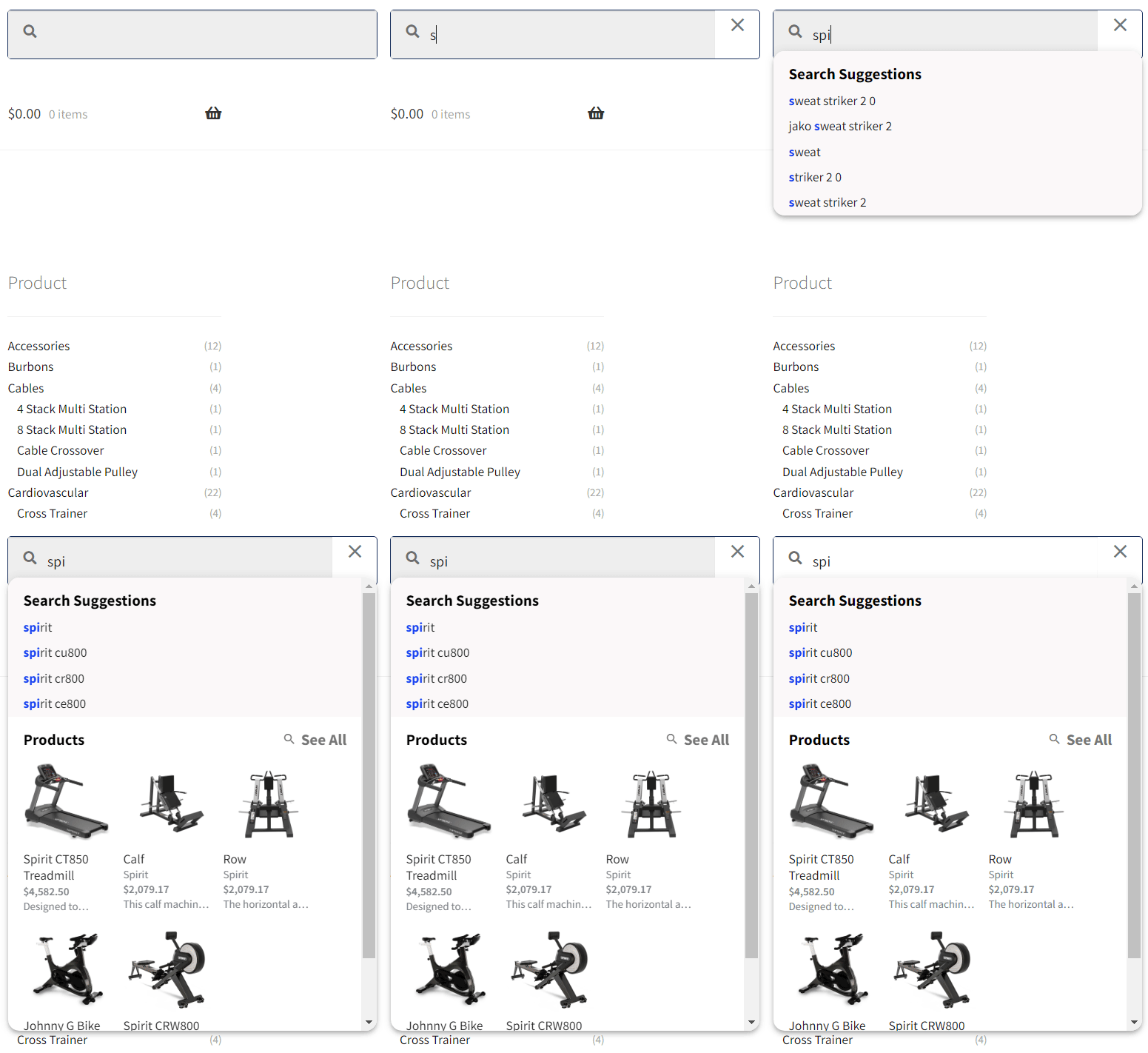
Watch results appear while the shopper types
The animation shows suggestions and matching results appearing before the shopper submits the search. It demonstrates the interaction rather than a controlled speed test.
Tune relevance to the way you sell
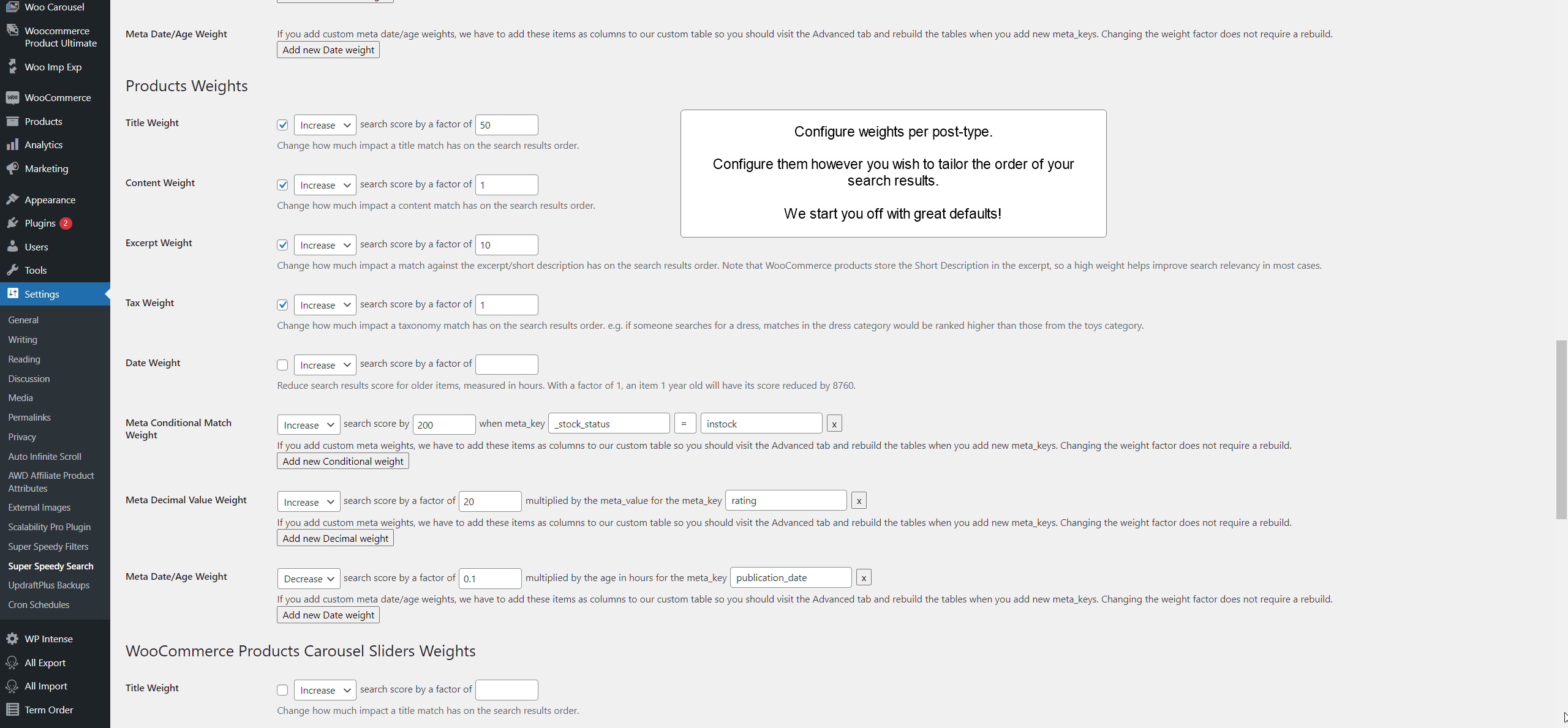
Set title, taxonomy, content and metadata weights separately for each post type. Test representative terms, map known equivalents with synonyms, then use Top Searches to find queries that still need work.
Check the fit before you buy
Super Speedy Search is a good fit when
- Default WordPress or WooCommerce search gets slower as the catalogue or content grows.
- Shoppers need results while typing, not only after submitting a search page.
- You need deliberate relevance weighting across titles, taxonomies, content and product metadata.
- You prefer an index stored on your own site without an external search subscription.
What it deliberately does not do
- No fuzzy matching or automatic typo correction. Prefix matching means
drescan find “dress”;dreeswill not. Add synonyms for known misspellings. - No zero-maintenance external service. The local index must be built and kept current. Normal and full rebuild modes let you choose whether suggestions are rebuilt too.
- No promise of one universal response time. Search speed depends on hosting, database, index size, query and configuration.
- No claim of verified WPML support. Polylang has explicit language handling; WPML is not currently verified.

Super Speedy Search Knowledge Base
View full Knowledge Base →- Analytics & Caching: Track Searches and Cache Hot Results
- Faster wp-admin meta search
- Multi-search: Prioritise Recent Content for Faster Searches
- Restricting a search box to one category
- Searching multiple post types in full-page search results: Single ranked list vs Mixed sections
- Smart Variation Search
- Taxonomy combination suggestions
- Taxonomy Search
- Adjusting Super Speedy Search Weights
- Ajax Search Panel – Super Speedy Search Settings
- Getting Maximum Speed from Super Speedy Search
- How to add the Super Speedy Search widget into your header
- Installing and configuring Super Speedy Search
- Main Super Speedy Search Settings
- MariaDB "DOUBLE value is out of range" after a rebuild
- Meta Search – Super Speedy Search Settings
What's new in Super Speedy Search?
View full changelog →- Fixed a complete rebuild not recording the schema version on the common path where the suggestions table already exists and a forced suggestions rebuild is off. That path returned early, before the finalising step that writes the recorded version and flushes the object cache, so a rebuild could report success yet leave the version stale — and the query layer, which trusts that version, kept assuming an older schema. An
allrebuild now always finalises, whichever path it takes.
- Added an MCP / AI-agent surface. Eleven abilities under the
sssnamespace let an AI assistant read and tune your search configuration through the WordPress Abilities API (WordPress 6.9+), over the standard REST endpoints with an Application Password. No extra plugin is needed on the site. - Added
sss/test-query, the ability the rest depend on: it runs a real front-end search and returns the ranked results together with the score breakdown for each one, so an assistant can see which column earned each result its position instead of guessing. - Added read abilities
describe-search-config(the full weight, column, synonym and combination vocabulary as data, including a plain statement that there is no fuzzy typo matching),get-index-status,get-weights,list-synonymsandget-combination-settings. - Added write abilities
set-weights,upsert-synonyms,delete-synonym,set-combination-settingsandrebuild-index. Unknown weight keys are rejected with the list of valid ones rather than silently written. rebuild-indexrebuilds a batch at a time against a cursor, so a large catalogue can be rebuilt over HTTP without hitting a timeout. It refuses to resume if the settings changed mid-rebuild.- Added the
sss_manage_searchcapability and a "Search Manager" role, so the account an AI agent uses needn't be a site administrator. Existing administrators get the capability automatically. - Added a stdio MCP bridge (
tools/sss-abilities-mcp-bridge.mjs) for connecting Claude Code, Claude Desktop or any other MCP client to a site. - The Search Manager role is now created on plugin activation and under WP-CLI, so
wp user create <name> --role=sss_search_managerworks without first loading a wp-admin page. - Fixed "WordPress database error Unknown column 'language'" on every keystroke for sites whose suggestions table predates 5.44. The suggestions query decided whether that column existed by reading the schema version hard-coded in the plugin file rather than the one recorded in the database, so the check was true in every release since 5.44 and the query always referenced the column. It now reads the recorded version, and an install still on the older schema simply serves suggestions unfiltered by language instead of erroring.
- Fixed a rebuild reporting success while leaving the suggestions table on an old schema. The table structure is now created and migrated by every rebuild scope, including when post-title suggestions are switched off — that is cheap DDL only, so rebuilds with suggestions disabled stay just as fast, and the expensive token build is still skipped.
- The recorded schema version is now written once, as the final step of a complete rebuild, instead of by the search stage. It used to advance on rebuilds that never touched the suggestions tables, so it could claim a structure the database did not have.
- Fixed the rebuild's option writes being invisible to a persistent object cache (Redis, Memcached) when run from the admin Rebuild button or the schedule. Those writes go straight to the database, so the cached values survived them; only the WP-CLI rebuild cleared the cache afterwards. All three paths now finish the same way.
- Fixed the
?showweights=1debug breakdown not adding up to the total relevance score. The excerpt, taxonomy and meta-value contributions were being multiplied by their weight factor twice, and the base fulltext score was not shown at all. The displayed contributions now sum to the score they explain. - Fixed a SQL error that broke search entirely when
?showweights=1was on and every search term was consumed by a synonym group.
Frequently asked questions
wp sss rebuild, or the guarded SQL export. A normal rebuild keeps an existing suggestions table; a full rebuild recreates it.M.2, Wi-Fi 6 and segmented SKUs such as AB-12-93.tshirt find “T-shirt”, wifi find “Wi-Fi” and ABC123 find ABC-123. Mid-SKU components can also match. If punctuation differences must never collide, enable Strict SKU search to check the original metadata after FULLTEXT has narrowed the candidates.Works well with
Some combinations get a bigger discount than others. Add this set to your basket to see its price.





13 reviews for Super Speedy Search
Invest in Speed
Yearly plans include a year of updates and support and the plugin keeps working afterwards – renew at 30% off. Upgrade to a lifetime plan in your first 6 months and just pay the difference. Backed by our 60-day money-back guarantee.
1 Site
- Yearly licence – 1 year of updates and support, keeps working afterwards
- 1 Site License
- Instant as-you-type search
- Category, brand & attribute suggestions
- 1 support seat – chat live with our engineers on Discord
5 Sites
- Yearly licence – 1 year of updates and support, keeps working afterwards
- 5 Site Licenses
- Instant as-you-type search
- Category, brand & attribute suggestions
- 1 support seat – chat live with our engineers on Discord
25 Sites
- Yearly licence – 1 year of updates and support, keeps working afterwards
- 25 Site Licenses
- Instant as-you-type search
- Category, brand & attribute suggestions
- 1 support seat – chat live with our engineers on Discord
- Priority support
5 Sites
- Lifetime licence – updates and support for life
- 5 Site Licenses
- Instant as-you-type search
- Category, brand & attribute suggestions
- 1 support seat – chat live with our engineers on Discord
25 Sites
- Lifetime licence – updates and support for life
- 25 Site Licenses
- Instant as-you-type search
- Category, brand & attribute suggestions
- 1 support seat – chat live with our engineers on Discord
- Priority support
250 Sites
- Lifetime licence – updates and support for life
- 250 Site Licenses
- Instant as-you-type search
- Category, brand & attribute suggestions
- 2 support seats – chat live with our engineers on Discord
- Priority support
Start with the plan you need today.
If you need more sites later, move up without buying the plugin twice.
to try it properly
Ask for a full refund within 60 days of purchase, for any reason.
Upgrade and pay the difference
Within 60 days, your original payment counts in full towards a larger plan, including lifetime.
Example based on our €79 yearly and €279 lifetime plans.
Upgrading later? You still get credit after 60 days, though the credit reduces over time on yearly plans.
How do yearly renewals work?
A yearly licence includes one year of updates and support. The plugin keeps working after that. Renewal for further updates and support is optional. Renew before or within one month after expiry for 30% off, within six months for 20% off, or later for 10% off. Full terms
Agency or hosting company? Get in touch for custom pricing

Sarah L. (verified owner) –
I already use a couple of products from Dave so when I need a good search plugin for a busy ecom website I didn’t need to look any further. I am not as techy as some of the people here, but I had that search up and running in minutes. It works really well, its fast and it does everything you would want (& more) from a search plugin. Excellent – thank you
John Koenig (verified owner) –
Game changing plugin with fantastic and responsive support. Our operation is currently small in scope when compared to other sites powered by Super Speed Search, however, we now have the confidence that we can continue to grow our catalog without destroying Woo’s performance.
alan m. (verified owner) –
Awesome support and a great product – I had trouble using the product and Dave went out of his way to help and to get it working for me. Highly recommended – great plugin for search. Thank you
Timothy L. (verified owner) –
This is really a game-changer for searching (products in my case) faster. It dropped a product search from 45 sec+ to 2-3 sec in combination with Scalability Pro. This is used on a website with 3000 products and as much variation. When you want to make your search faster, this is the plugin you need!
Daelmir –
Dave managed to achieve a full integration with my Woodmart e-commerce theme. On a store with thousands of products, product search is crucial, and speed is a precious asset. Previously, with Woodmart’s AJAX search, results took on average 2 to 3 seconds to load — now, thanks to Dave’s work, the search is instant. I highly recommend Speedy Search and thank David for what he has done!
Zlati Z. (verified owner) –
That is the best search plugin on the market and I can guarantee that – I have tried pretty much everything. I have a website with over 500k posts and I got to the point that I was thinking of removing my search bar. SSS is the way to go! Ordering and giving weights to search is easy, AJAX speeds are incredible. Thank you for making this plugin!
Michel N. (verified owner) –
After using 2 other plugins from Super Speedy Plugins, our choice for a new search plugin easily fell to Super Speedy Search: fast and immediate support and of course amazing speed!
I also use Scalability Pro and Infinite Scroll, so when our previous search plugin provider raised prices 50-fold, we needed a new search plugin. Knowing that this existed, it was a quick and painless switch to Super Speedy Search as it would also improve back-end search, something we were struggling with as with about 35.000 products it wasn’t always as fast as we wanted it
Mark F. –
This is precisely the search plugin you need for your WooCommerce website. It performs well with our 50,000+ product catalogue.
Support from Dave and his team has been excellent and any issues are resolved quickly.
Thats 5 stars from me!
Justin Murray –
Incredible woocommerce search plugin, performs great, support is fast if needed, and integrates well into my theme.
Andrew G. (verified owner) –
I have been using Super Speedy Filters few years now and would recommend it to anyone running a large WooCommerce store. The filters are rapid compared to default WordPress ones and support is second to none. 10/10
Andrew G. (verified owner) –
I have been using Scalability Pro (also made by WP Intense) for a good few years now with no complaints and recently added Super Speedy Search and their Super Speedy Filters to our site.
Super Speedy Search is working great on our site which has a hundred or so products, but the products have quite a lot of variations on them. Previously loading the full search results page was getting quite slow. Now with Super Speedy Search, when the customer hits enter or clicks to see all of the products from their search results it displays that page much quicker than any other plugin we have used previously. I’m very pleased with this, it is like some sort of performance wizardry!
Customer service is great too and being able to get help from the discord server is very quick and convenient.
Kostas M. (verified owner) –
Amazing plugin to create comprehensive and the fastest search for WP.
It looks great and does exactly what the information says it will!
After testing many pro search plugin, we found that SuperSpeedSearch was the only that could handle the amount of our products (300k+)!
The support we received was fantastic–very timely and helpful! Any question & problem we’ve had has been answered & resolved.
We were looking for a very advanced plugin and this plugin has helped us do just about everything we were looking for and more.
Keep going wpintense team!!!
Shawn T. (verified owner) –
Our current WP websites have been really laggy and despite switching to more powerful servers, we kept encountering bottlenecks until we found WPI.
We are currently using Super Speedy Search + Scalability Pro and it has been phenomenal with the performance improvements!
Across 2 of our websites on 1 server, we are looking at 90k MAU with 6k products total.
Dave has also been a great help with any bugs during the setup process – really speedy response and he sure knows what he is doing!